For years, getting the most value out of veterinary software meant memorizing specific clicks, screens, and commands. Switching platforms meant starting that learning curve all over again. But that’s changing fast.
Today, AI tools are reshaping how veterinary teams work with their software.
That’s the idea behind Atlas, a new AI assistant from Patterson. Atlas works with most veterinary software platforms and it is also built into NaVetor. Atlas isn’t a new screen to learn or one more feature buried in a menu. It’s a true AI assistant that already knows your software and is built to do the work for you, so your team spends less time with clicks and commands and more time with patients and clients.
Over the past few years, AI tools have become common in veterinary practices, capturing exam details to draft a SOAP note, helping read an x-ray, or transcribing a client call. Many now connect to software platforms.
The more innovative platforms are now building AI assistants directly into the software to handle the repetitive, administrative work that quietly eats hours of staff time every week. The payoff is greater efficiency, fewer dropped tasks, and far less time spent clicking through menus and pulling reports.
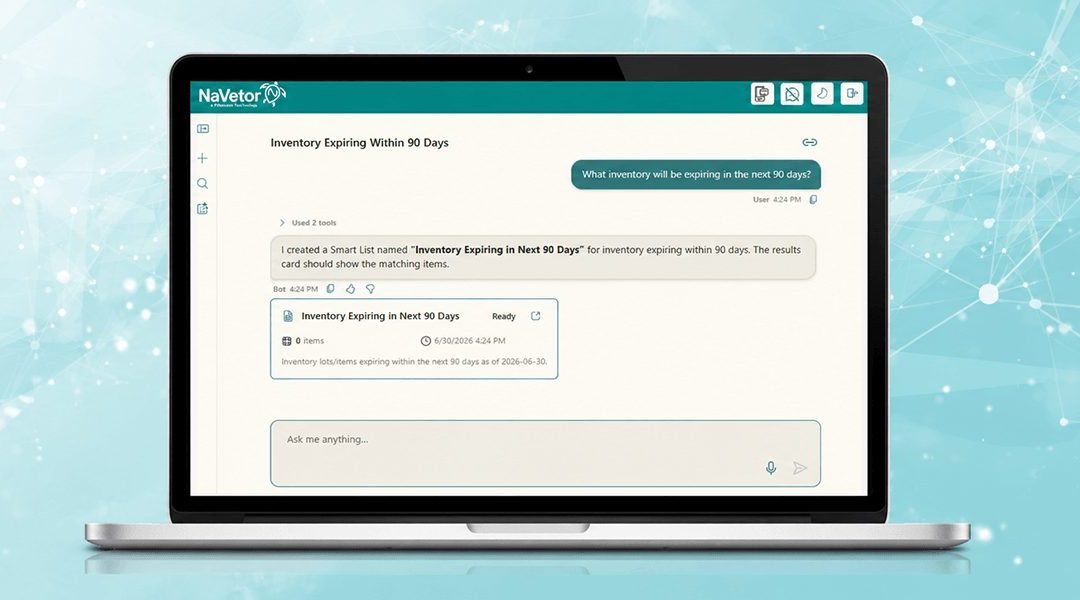
Inside NaVetor, tasks that once required specialized software knowledge can be done in seconds with a simple prompt for Atlas. A few examples:
- Inventory cleanup. Instead of manually pulling reports of inventory codes missing a billing category, Atlas identifies them and recommends which category to add.
- Surgery prep review. Instead of reviewing the weekly schedule for surgeries with pending pre-op needs like bloodwork or consent, Atlas surfaces them in seconds.
- Appointment confirmations. Instead of pulling a list of unconfirmed appointments and drafting reminders one by one, Atlas pulls the list and sends polished reminders almost instantly.
- Case review. Instead of adding a walk-in to the schedule, hunting for the record, and skimming the history, Atlas does all three at once and gives you a quick summary before the patient is in the exam room.
Atlas changes the game from knowing where things are to knowing how to ask.
What Atlas Can Do Today
Atlas’ capabilities are growing quickly, and the practical value compounds with each addition. Today, Atlas can:
- Pull, review, and summarize client text conversations so your team always has context.
- Draft and send discharge notes to clients, including translation into other languages when needed.
- Flag expiring-soon products, low-stock alerts, and other inventory tasks and risks before they become problems.
- Review and summarize patient appointment histories and medical records, including reminders and medications due.
- Streamline workflows for the front desk, technicians, and veterinarians, supporting more consistent processes across the whole team.
That list keeps growing, with new capabilities added regularly. The result is less time spent working in the software and more time spent on patient care, plus more consistent workflows across your staff.
How to Evaluate an AI Tool
Whether you’re weighing a full platform like NaVetor that includes a built-in assistant, or a standalone AI tool that bolts onto your existing system, a handful of questions will tell you a lot about the quality of the tool.
- How was the AI trained, and how current is the data? A model trained on small-animal cases from several years ago may not perform well for a mixed-animal practice. Ask how recently the tool was trained and how it stays current. Atlas is continuously improved based on real-world practice data and user feedback, with regular updates to keep results accurate and helpful in day-to-day workflows.
- How was accuracy validated, and can you see the results? Legitimate AI tools have validation data to share. If a vendor can’t show you how accuracy was measured, treat that as a warning sign.
- How well does it integrate with your software? Tools that aren’t native to your platform need to integrate smoothly. Extra clicks and steps to move data around erase efficiency. Because NaVetor includes Atlas, there’s nothing to bolt on.
- Who owns the patient data, and how is it secured? Understand exactly what the tool can access, where data is stored, and what happens to it if the vendor is acquired or shuts down. With Atlas, you own your data, and it’s never shared outside the practice.
- How easy is it to override or correct the output? Any AI in a clinical workflow should make human review fast and simple. If correcting the output is hard, that’s a red flag.
Atlas draws on your practice’s own data to answer staff questions in context. And Patterson is building toward a voice-driven experience that will let teams talk to their data inside NaVetor rather than navigate to it.
A Smart Reason to Look at NaVetor
If you’re evaluating a software switch, an AI assistant like Atlas changes the game. One of the biggest costs of switching has always been the learning curve. An AI assistant that already knows the software, does the digging, and answers in plain language shortens that runway considerably.
Atlas is included with NaVetor’s affordable monthly subscription, alongside the client- and practice-facing mobile apps, two-way texting, and client communications, and NaVetor is backed by Patterson’s industry-leading support via email, live chat, and scheduled callbacks. Patterson makes switching easy, with special offers on data conversions, training, and onboarding support.
Interested in seeing NaVetor and Atlas in action? Request a demo today.